- Tutorial: Answering Support Questions with RAG in Chalk SQL
Tutorial: Answering Support Questions with RAG in Chalk SQL
Build a support assistant in a Chalk notebook. Embed help-center articles, retrieve passages with Chalk SQL, answer with citations, map the results, and compare two versions with an evaluation.
Retrieval-augmented generation (RAG) answers a question in two steps: it finds the passages of text most related to the question, then asks a model to answer from those passages. In this tutorial you will build a small support assistant for a fictional lender. It answers customer questions such as “My autopay bounced. What will I be charged?” from 40 help-center articles, and cites the articles it used.
Everything runs in one Chalk notebook, and the retrieval and the answers run in Chalk SQL. In this tutorial you will:
- Make a test call to a model from a SQL cell
- Load the articles and embed them
- Find the passages closest to a question
- Map the help center and see where each question lands
- Write an answer that cites its sources
- Measure the answers with an evaluation, and compare two versions
- Clean up
The articles and questions are in the
tutorials/help-center-rag
folder of the chalk-ai/examples repository. The notebook downloads them, so you do not need
to clone anything.
Before you start
You need:
- A Chalk account and an environment to work in.
- A role that can create notebooks, deploy a function, and run an evaluation: the
notebook.write,deploy.create, andquery.offlinepermissions. If you created your Chalk team yourself, you already have them. Otherwise, ask an admin for a role that includes them. See Permissions. - An OpenAI provider connection in your Model
Gateway, named
openai. The tutorial uses OpenAI’stext-embedding-3-smallmodel for embeddings andgpt-4.1-minifor answers. If your connection has a different name, replaceopenai/in each model name with your connection’s name.
The model calls go through the Model Gateway and are billed to your OpenAI connection. The whole tutorial makes about 200 short requests.
Create the notebook
In the Chalk dashboard, open Notebooks and create a notebook. Each code block below is one cell, and the text before it says whether to add a Python cell or a SQL cell. For every SQL cell, choose Chalk SQL as its dialect. Add the cells in order, and run each one after you add it.
The first cell updates chalkcompute, the Python package the notebook uses to save datasets,
deploy a function, and run an evaluation. Add it as a Python cell and run it before any other
cell, and again first after the kernel restarts:
!uv pip install --upgrade chalkcomputeStep 1: Call a model from SQL
Add a SQL cell and choose Chalk SQL as its dialect. ai_complete sends a prompt to a model
through your Model Gateway:
SELECT ai_complete(
  'Reply with one word: ready.',
  model => 'openai/gpt-4.1-mini',
  max_tokens => 10
).completion AS reply
reply
-----
ReadyYou did not pass an API key. A SQL query that calls a model goes through your environment’s Model Gateway as you, and the gateway uses your OpenAI connection’s credential.
Step 2: Load the articles and embed them
An embedding is a list of numbers that represents the meaning of a piece of text. Texts with similar meanings have embeddings that point in similar directions, which is how the assistant finds the passages that relate to a question.
Add this Python cell. It downloads the articles and the questions, splits each article into passages (one per paragraph), and saves both as datasets:
import json
import urllib.request

import chalkcompute

DATA_URL = "https://raw.githubusercontent.com/chalk-ai/examples/main/tutorials/help-center-rag/data"


def download(name):
    with urllib.request.urlopen(f"{DATA_URL}/{name}") as response:
        return json.load(response)


articles = download("articles.json")
questions = download("questions.json")

# Each paragraph of an article becomes one passage.
passages = [
    {
        "passage_id": f"{article['id']}-{number}",
        "article_id": article["id"],
        "topic": article["topic"],
        "title": article["title"],
        "text": paragraph,
    }
    for article in articles
    for number, paragraph in enumerate(article["body"].split("\n\n"), start=1)
]

datasets = chalkcompute.DatasetClient()
uploaded = [
    datasets.upload("help-center-passages", passages),
    datasets.upload("help-center-questions", [{"question": q["question"]} for q in questions]),
]
print(f"Uploaded {len(passages)} passages from {len(articles)} articles, and {len(questions)} questions.")
Uploaded 120 passages from 40 articles, and 14 questions.A dataset is readable from Chalk SQL as chalk.datasets."<name>". Add a SQL cell that embeds
every passage with openai_embed. Before you run it, name its result variable embedded: click
the variable name below the cell, such as dataframe_2, type the new name, and press Enter. Later
cells use the result by that name.
SELECT
  passage_id,
  article_id,
  topic,
  title,
  text,
  openai_embed(text, model => 'openai/text-embedding-3-small').embedding AS embedding
FROM chalk.datasets."help-center-passages"
The result is one row per passage, each with an embedding of 1,536 numbers. Add a Python cell that saves it as a dataset, so the next steps can search the embeddings without computing them again:
uploaded.append(datasets.upload("help-center-embeddings", embedded))
print("Saved the embeddings as help-center-embeddings.")Step 3: Find the passages closest to a question
cosine_similarity_vector scores how closely two embeddings point the same way, from -1 to 1.
Add a SQL cell with this query. It embeds a question, scores every passage against it, and keeps
the five best:
SELECT
  p.title,
  p.passage_id,
  cosine_similarity_vector(p.embedding, q.embedding) AS score
FROM chalk.datasets."help-center-embeddings" AS p,
  (SELECT openai_embed(
     'What happens if my payment is a few days late?',
     model => 'openai/text-embedding-3-small'
   ).embedding AS embedding) AS q
ORDER BY score DESC
LIMIT 5
title passage_id score
-------------------- ---------------------- ------
Late fees late-fees-1 0.698
If a payment is late late-payment-1 0.674
If a payment is late late-payment-2 0.662
Late fees late-fees-2 0.612
Returned payment fee returned-payment-fee-3 0.590Your scores can differ slightly in the last digits. The article that answers this question, If a payment is late, has the second and third passages. Late fees ranks first: its first paragraph is also about late payments. Keep this question in mind for the next step.
Step 4: Map the help center
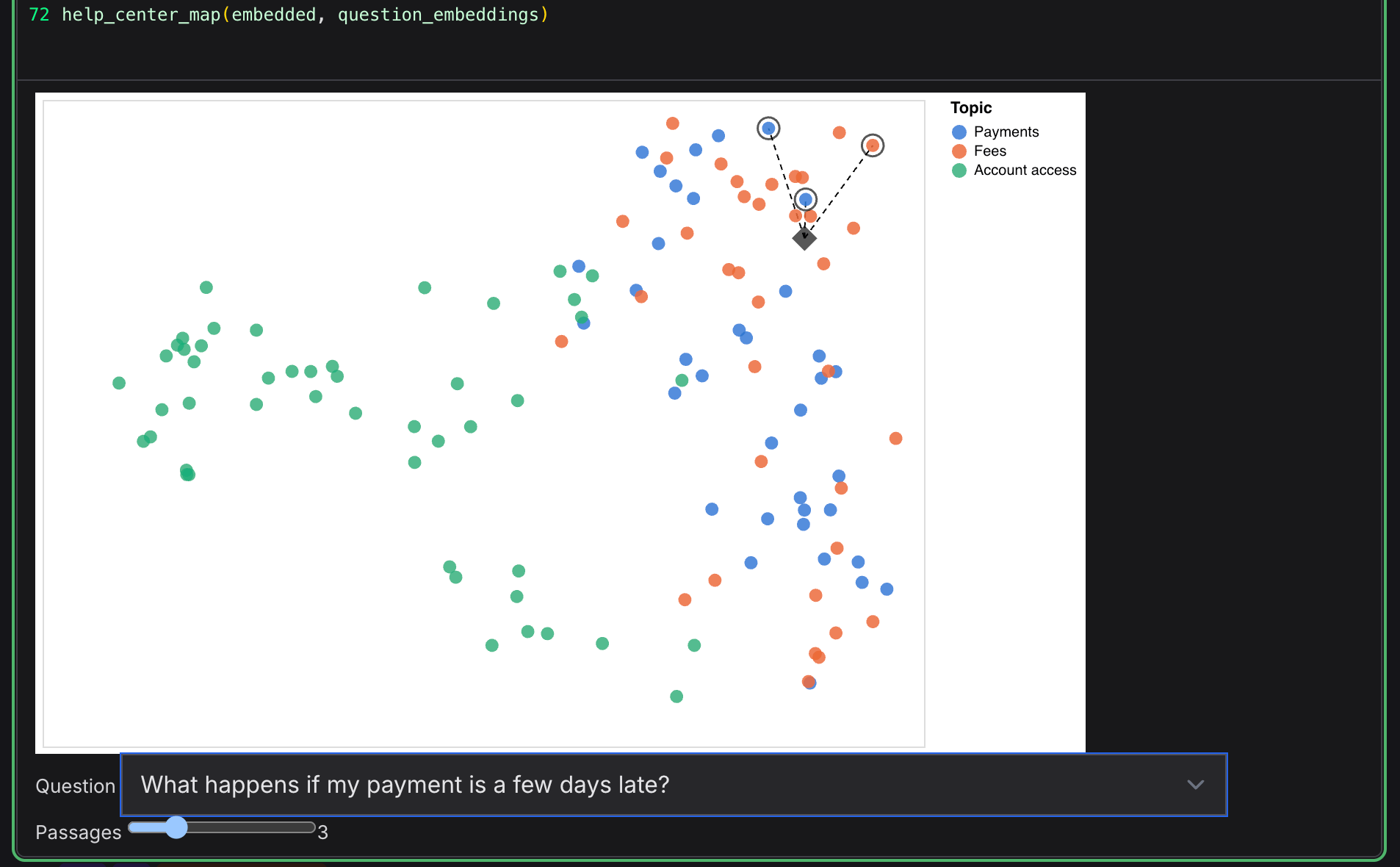
A map shows what the search sees. Each passage becomes a dot, placed so that passages with similar embeddings sit close together, and each question lands among the passages it matches.
First, embed the questions. Add a SQL cell and name its result variable question_embeddings
before you run it:
SELECT
  question,
  openai_embed(question, model => 'openai/text-embedding-3-small').embedding AS embedding
FROM chalk.datasets."help-center-questions"
Then add this Python cell. It flattens the embeddings to two dimensions and draws them with Altair, which the notebook includes:
import altair as alt
import numpy as np


def help_center_map(embedded, question_embeddings):
    passages = embedded.to_pandas()
    asked = question_embeddings.to_pandas()
    vectors = np.vstack(passages["embedding"])
    question_vectors = np.vstack(asked["embedding"])

    # Project the 1,536-number embeddings onto the two directions where they vary most.
    center = vectors.mean(axis=0)
    _, _, directions = np.linalg.svd(vectors - center, full_matrices=False)
    xy = (vectors - center) @ directions[:2].T
    question_xy = (question_vectors - center) @ directions[:2].T

    # Score every passage against every question, so the chart can filter in the browser.
    unit = vectors / np.linalg.norm(vectors, axis=1, keepdims=True)
    question_unit = question_vectors / np.linalg.norm(question_vectors, axis=1, keepdims=True)
    scores = question_unit @ unit.T
    rows = []
    for qi, question in enumerate(asked["question"]):
        for rank, pi in enumerate(np.argsort(-scores[qi]), start=1):
            rows.append({
                "question": question,
                "title": passages["title"][pi],
                "text": passages["text"][pi],
                "topic": passages["topic"][pi],
                "score": round(float(scores[qi, pi]), 3),
                "rank": rank,
                "x": float(xy[pi, 0]),
                "y": float(xy[pi, 1]),
                "qx": float(question_xy[qi, 0]),
                "qy": float(question_xy[qi, 1]),
            })
    data = alt.Data(values=rows)

    question = alt.param(
        name="question",
        value=asked["question"][0],
        bind=alt.binding_select(options=list(asked["question"]), name="Question "),
    )
    top_k = alt.param(name="top_k", value=3, bind=alt.binding_range(min=1, max=10, step=1, name="Passages "))
    topic = alt.selection_point(fields=["topic"], bind="legend")
    hidden = alt.Axis(labels=False, ticks=False, title=None, grid=False, domain=False)
    this_question = alt.datum.question == question
    top_passages = this_question & (alt.datum.rank <= top_k)

    return alt.layer(
        alt.Chart(data).transform_filter(top_passages).mark_rule(strokeDash=[4, 3], color="black").encode(
            x="qx:Q", y="qy:Q", x2="x:Q", y2="y:Q"
        ),
        alt.Chart(data).transform_filter(this_question).mark_circle(size=80).encode(
            x=alt.X("x:Q", axis=hidden, scale=alt.Scale(zero=False)),
            y=alt.Y("y:Q", axis=hidden, scale=alt.Scale(zero=False)),
            color=alt.Color("topic:N", title="Topic", scale=alt.Scale(
                domain=["Payments", "Fees", "Account access"],
                range=["#2a78d6", "#eb6834", "#1baf7a"],
            )),
            opacity=alt.condition(topic, alt.value(0.85), alt.value(0.1)),
            tooltip=["title:N", "text:N", "score:Q", "rank:Q"],
        ).add_params(topic),
        alt.Chart(data).transform_filter(top_passages).mark_circle(
            size=220, filled=False, strokeWidth=1.5, color="black"
        ).encode(x="x:Q", y="y:Q"),
        alt.Chart(data).transform_filter(this_question & (alt.datum.rank == 1)).mark_point(
            shape="diamond", size=300, filled=True, color="black"
        ).encode(x="qx:Q", y="qy:Q"),
    ).add_params(question, top_k).properties(width=600, height=440)


help_center_map(embedded, question_embeddings)
The cell draws the map below the code. Here it is with “What happens if my payment is a few days late?” selected:
Use the controls below the map:
- Question: picks the question. The diamond shows where it lands, and dashed lines connect it to the passages the search ranks highest.
- Passages: sets how many of those passages to connect, from 1 to 10.
- Hold the pointer over a dot to read the passage and its score for the selected question. Click a topic in the legend to fade the other two.
Account access passages form their own cluster. Payments and Fees overlap, because many fee articles are about payments. Select “What happens if my payment is a few days late?”: it lands mostly among Fees passages, and Late fees ranked first for it in Step 3.
The map is approximate: two dimensions keep only part of what 1,536 numbers describe, so a passage that looks close on the map can still rank lower. The ranking in Step 3 uses the full embeddings.
Step 5: Answer with citations
Now give the top passages to a model. Add a SQL cell with this query. It finds the three
passages closest to the question, joins them into the prompt with array_agg and array_join, and asks the model to
cite the article for each fact:
SELECT ai_complete(
  'Answer the customer question using only the help-center passages below. '
  || 'After each fact, cite the article id in brackets, like [autopay]. '
  || 'If the passages do not answer the question, say so.\n\nPassages:\n'
  || array_join(array_agg('[' || article_id || '] ' || text), '\n')
  || '\n\nQuestion: My autopay bounced. What will I be charged, and will you try again?',
  model => 'openai/gpt-4.1-mini',
  temperature => 0,
  max_tokens => 500
).completion AS answer
FROM (
  SELECT p.article_id, p.text,
    cosine_similarity_vector(p.embedding, q.embedding) AS score
  FROM chalk.datasets."help-center-embeddings" AS p,
    (SELECT openai_embed(
       'My autopay bounced. What will I be charged, and will you try again?',
       model => 'openai/text-embedding-3-small'
     ).embedding AS embedding) AS q
  ORDER BY score DESC
  LIMIT 3
) AS top_passages
If your autopay withdrawal fails, we will email you the same day and try the withdrawal once
more 3 business days later [autopay]. If the returned payment was an autopay withdrawal, we try
it once more 3 business days later and you aren't charged a second fee for that retry, even if
it also fails [returned-payment-fee]. If the retry fails, you should make your payment another
way to avoid a late fee [returned-payment-fee].The answer cites the two articles it needed: Set up autopay for the retry, and Returned payment fee for the fee. It still leaves out how much the fee is. The paragraph that says the fee is $15 ranks fourth for this question, one place outside the three passages the query keeps. To see it, select this question on the map and move the Passages slider to 4.
Step 6: Measure the answers, and compare two versions
One good answer does not tell you how the assistant does across many questions. An evaluation runs a task on every row of a dataset and scores each result. Here, the task answers one question, and the score is 1 when the answer cites every article that should answer it.
questions.json lists the expected articles for each of the 14 questions. Four of the
questions need two articles.
Add this Python cell. It runs two evaluations that differ in one setting, k, the number of
passages the model sees:
from datetime import datetime

import chalkcompute

ANSWER_SQL = """
SELECT ai_complete(
  'Answer the customer question using only the help-center passages below. '
  || 'After each fact, cite the article id in brackets, like [autopay]. '
  || 'If the passages do not answer the question, say so.\\n\\nPassages:\\n'
  || array_join(array_agg('[' || article_id || '] ' || text), '\\n')
  || '\\n\\nQuestion: ' || {question},
  model => 'openai/gpt-4.1-mini',
  temperature => 0,
  max_tokens => 500
).completion AS answer
FROM (
  SELECT p.article_id, p.text,
    cosine_similarity_vector(p.embedding, q.embedding) AS score
  FROM chalk.datasets."help-center-embeddings" AS p,
    (SELECT openai_embed({question}, model => 'openai/text-embedding-3-small').embedding AS embedding) AS q
  ORDER BY score DESC
  LIMIT {k}
) AS top_passages
"""


@chalkcompute.function(name="help-center-answer", chalk_identity=True)
def answer(question: str, k: int) -> str:
    quoted = "'" + question.replace("'", "''") + "'"
    result = chalkcompute.SQLClient().query(ANSWER_SQL.format(question=quoted, k=k))
    return result.to_arrow().to_pylist()[0]["answer"]


def eval_rows(k):
    return [
        {
            "question": q["question"],
            "expected": q["expected"][0],
            "also_expected": q["expected"][1] if len(q["expected"]) > 1 else "",
            "k": k,
        }
        for q in questions
    ]


cites_right_articles = chalkcompute.scorers.sql(
    "cites-right-articles",
    """CASE WHEN strpos("output", '[' || "expected" || ']') > 0
       AND ("also_expected" = '' OR strpos("output", '[' || "also_expected" || ']') > 0)
       THEN 1.0 ELSE 0.0 END""",
)

suite = chalkcompute.EvaluationSuite.create(f"Help center RAG {datetime.now():%Y-%m-%d %H:%M}")

runs = {}
for k in (1, 3):
    eval_data = datasets.upload(f"help-center-eval-top-{k}", eval_rows(k))
    uploaded.append(eval_data)
    evaluation = chalkcompute.Evaluation.create(
        f"Top {k} passages",
        dataset=eval_data,
        task=answer,
        scorers=[cites_right_articles],
        suite_id=suite.id,
    )
    runs[k] = evaluation.run().wait()

for k, run in runs.items():
    scores = datasets.read(run.result_dataset).column("cites-right-articles_value").to_pylist()
    passed = sum(1 for score in scores if score == 1.0)
    print(f"Top {k} passages: {passed} of {len(scores)} answers cite the right articles")
    unanswered = sum(1 for score in scores if score is None)
    if unanswered:
        print(f"  {unanswered} question(s) got no answer; open the run in the dashboard to see the error")
The cell deploys answer, then runs both evaluations. It takes a few minutes:
Top 1 passages: 8 of 14 answers cite the right articles
Top 3 passages: 13 of 14 answers cite the right articles
A few details in this cell:
- The task is a deployed function.
answerruns the same query as Step 5, with the question andkfilled in. The dataset’squestionandkcolumns become its arguments. - The cell imports
chalkcomputeitself. The function runs on a Chalk worker that has only this cell’s code, so it cannot use imports from earlier cells. chalk_identity=Truelets the function’s SQL query run as you, the person who deployed it. Without it, the function has no permission to run queries.- The scorer is a SQL expression, so it needs no deployment.
outputis the task’s answer, andexpectedandalso_expectedare dataset columns. - The evaluations share a suite, so you can compare them in the dashboard. Suite names are unique in an environment, so the cell adds the date and time to the name.
Open Evaluations in the dashboard, then the suite named Help center RAG followed by the date and time you ran the cell. On the Overview tab, the Score comparison chart shows a pair of bars for each score, one bar for each evaluation.
With one passage, the model misses every question that needs two articles. Three passages fix those, at the cost of a longer prompt. One question still fails with three passages: open the Top 3 run to see which one, then find it on the map.
The score checks citations only. It counts the autopay answer from Step 5 as correct, even though that answer leaves out the fee amount. A score covers only what its scorer checks.
Step 7: Clean up
Add this Python cell. It deletes the function and the datasets, and archives the suite. It uses
answer, suite, and uploaded from earlier cells, so run it in the same kernel session as
Step 6. If the kernel has restarted since then, see Troubleshooting:
answer.delete()
suite.archive()
for ref in uploaded:
    datasets.delete(ref.dataset_id)
print(f"Deleted the function and {len(uploaded)} datasets, and archived the suite.")
Deleted the function and 5 datasets, and archived the suite.To delete the notebook, open the ⋯ menu at the right end of the notebook’s toolbar and select Delete.
What you built
| Step | Chalk feature |
|---|---|
| Call a model without an API key | ai_complete through the Model Gateway |
| Embed and search text | openai_embed and cosine_similarity_vector in Chalk SQL |
| Keep embeddings for later queries | A dataset, read as chalk.datasets."<name>" |
| See what the search sees | A Python cell with an interactive Altair chart |
| Measure and compare versions | An evaluation suite with a SQL scorer |
Next step
To search embeddings that are features of your own data, rather than a dataset, see Vector Search.
Troubleshooting
Both errors below happen when the notebook’s kernel has restarted partway through the tutorial, for example after the notebook sat idle for an hour (its default idle timeout).
NameError: name 'answer' is not defined in Step 7
The kernel restarted after Step 6, so the variables from earlier cells are gone. Run the upgrade cell first, then delete what the tutorial created:
- The function: run
chalkcompute.RemoteFunction.from_name("help-center-answer").delete()in a Python cell. - The datasets: in the dashboard, open Data > Datasets and search for
help-center. For each of the five datasets, select ⋯ at the end of its row, then Delete. - The suite: open it under Evaluations and select Archive.
AttributeError: 'DatasetClient' object has no attribute 'delete'
The session is using the notebook’s built-in chalkcompute, which is older than this tutorial
needs. A kernel restart returns the notebook to that version, and the upgrade cell has no effect
in a session that has already imported chalkcompute. Restart the kernel (Notebook settings >
Kernel > Restart kernel), run the upgrade cell before any other cell, then rerun the cells
you need. To clean up instead, follow the previous item.