- Introduction
- Choosing Where to Run Code
Introduction
Choosing Where to Run Code
Choose between a Sandbox, a Scaling Group, and a Function for a workload you run on Chalk.
Overview
Every workload you run on Chalk takes one of three shapes:
Sandbox: an isolated environment for a single ephemeral task, torn down when the task finishes.ScalingGroup: a replicated, HTTP-fronted service that stays running and autoscales.Function: a Python callable, deployed once and invoked remotely.
All three take the same runtime environment settings: an image, CPU, memory and GPU resources, environment variables and secrets, and volumes.
Choosing the right component
| Mental Model | Reach For | Example |
|---|---|---|
| An ephemeral task | Sandbox | Run an agent’s generated code, a one-off data backfill, or a per-session agent workspace that is torn down when the session ends |
| An application that lives forever | ScalingGroup | A vLLM inference server, an internal API, a persistent agent or chat backend, or a hosted MCP server |
| A (potentially long) RPC call | Function | An embedding or re-ranking endpoint, an enrichment call inside a resolver, or a “score this transaction” call that returns a float to the query server |
A Sandbox is an ephemeral task. Reach for a sandbox
by default. For a long-running process that needs to be reachable over HTTP,
use a Scaling Group.
A Function deploys your callable onto a Scaling Group and registers it in the Chalk Catalog. Use a Function when the workload needs to be reachable from Chalk SQL, a resolver, the query server, or a DataFrame, or when it needs async invocation, streaming results, nested calls, retries, concurrency caps, rate limits, or request-queue-driven autoscaling.
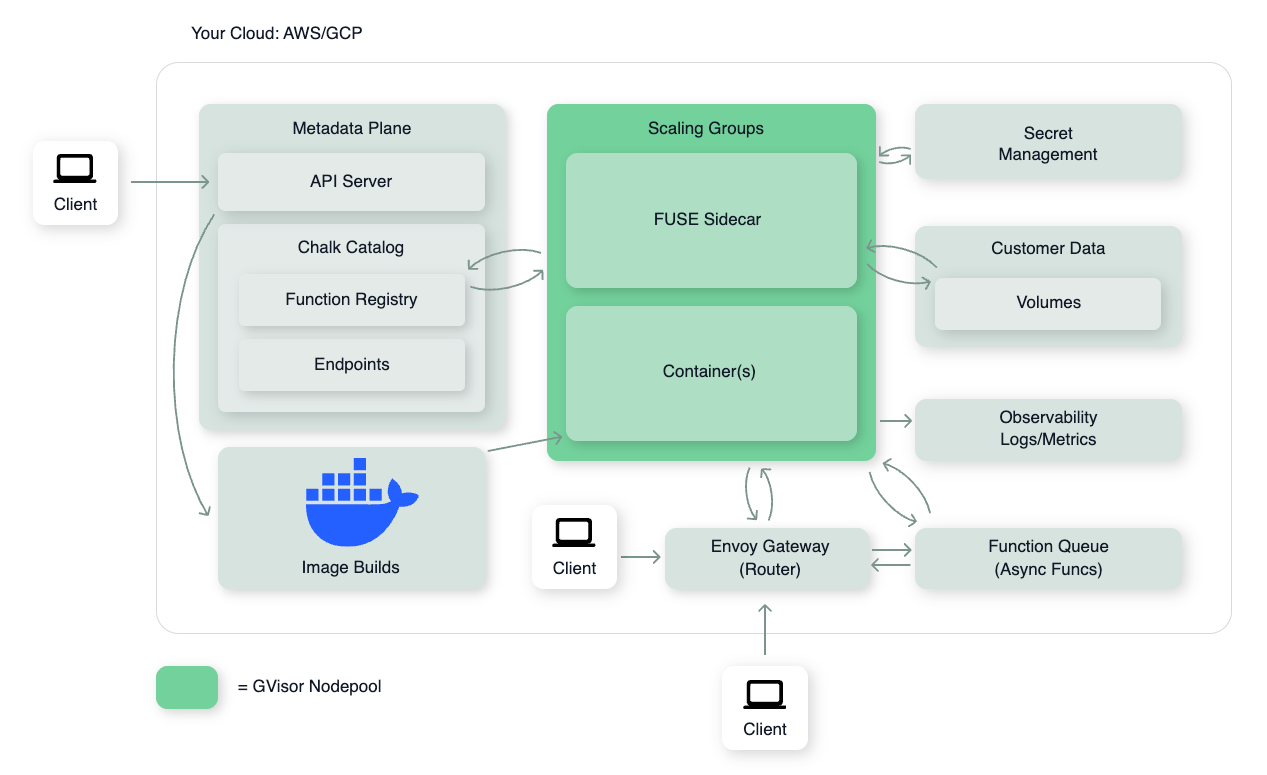
The diagram below shows how these components sit inside a Chalk-managed deployment in your cloud account. Sandboxes and scaling groups run on a gVisor-hardened nodepool; image builds, the function registry, secrets, and volumes are all reachable from the same VPC; clients can hit the API Server directly, the Envoy router for HTTP traffic into a scaling group, or the Function Queue for async invocations.