- Infrastructure
- How `chalk apply` Works
Infrastructure
How `chalk apply` Works
How `chalk apply` packages a Chalk project, builds container images, and rolls them out into the Data Plane.
chalk apply is the command that turns a local Chalk project (Python source plus the
schemas of features and resolvers it defines) into a running deployment in the Data Plane.
This page describes the end-to-end pipeline that runs when you invoke it: what the CLI
sends, what the Metadata Plane builds, where the artifacts live, and how the rollout
reaches your Kubernetes cluster.
High-level Flow
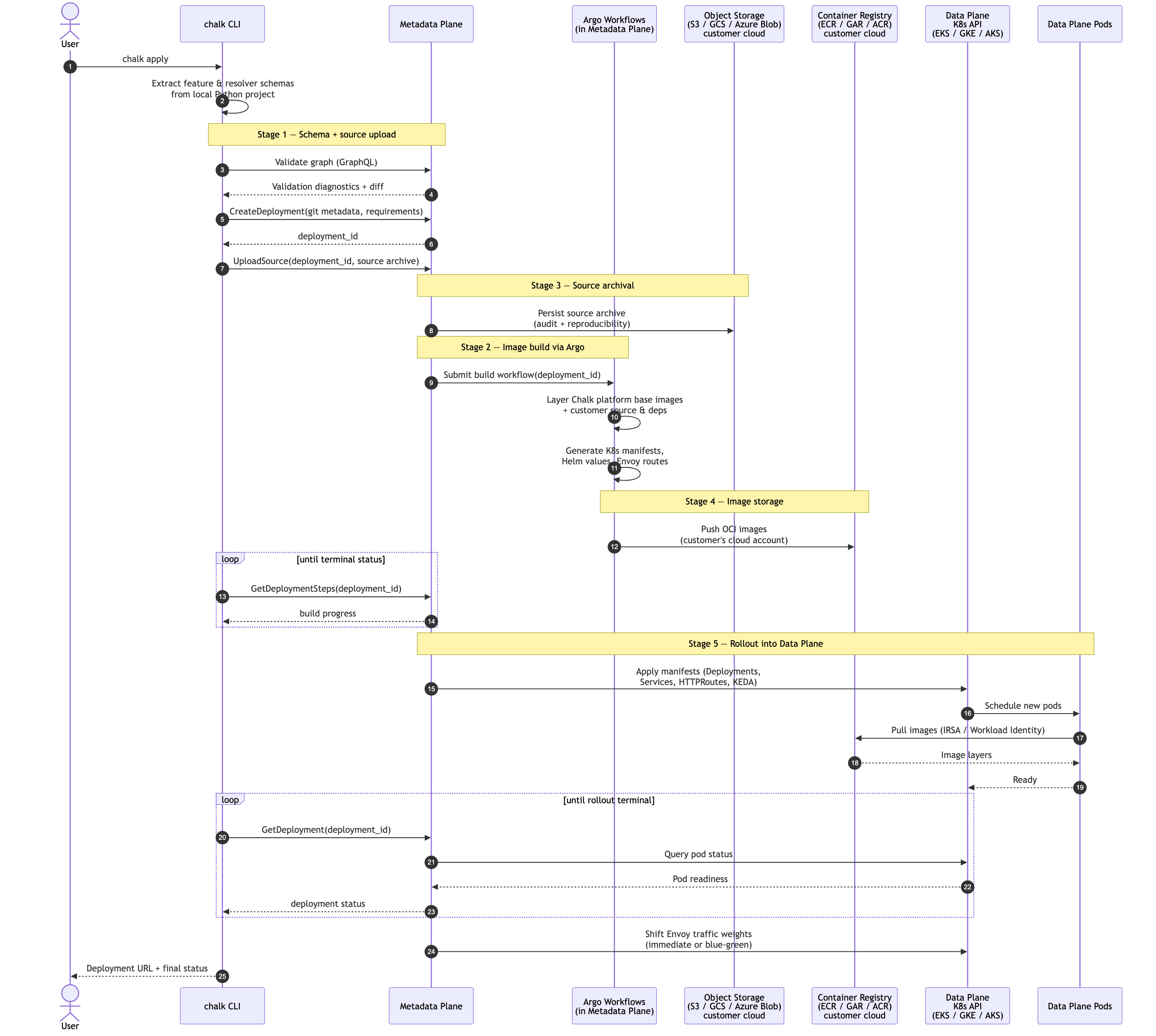
At a high level, chalk apply performs five stages:
- Schema + source upload. The client sends the schemas of features and resolvers, along with the project’s Python source code, to the Metadata Plane.
- Image build. The Metadata Plane uses Argo Workflows to package Chalk’s platform software together with the customer’s source code into OCI (“Docker”) container images and accompanying infrastructure configuration.
- Source archival. The uploaded source archive is stored in object storage (S3, GCS, or Azure Blob Storage) for audit and reproducibility.
- Image storage. The built Docker images are pushed to a container registry in the customer’s cloud account — Amazon ECR, Google Artifact Registry (GAR), or Azure Container Registry — depending on the cloud provider.
- Rollout. Once the build is ready, the Metadata Plane executes a rollout into the Data Plane Kubernetes cluster (EKS, GKE, or AKS) and manages traffic weighting between the previous deployment and the new one.
Stage 1 — Schema and Source Upload
When you run chalk apply, the CLI first introspects the local project:
- Graph extraction.
chalkpyruns locally to enumerate every feature class and resolver and produce a serialized representation of the feature graph. - Validation. The graph is sent to the Metadata Plane’s GraphQL API for remote
validation (type checks, dependency cycles, namespace conflicts). If
--forceis not passed, the CLI also fetches a diff against the currently deployed graph and prompts the user to confirm. - Deployment record. The CLI calls
BuilderService.CreateDeploymentwith git metadata, Python requirements, and project settings. The Metadata Plane responds with adeployment_id. - Source archive. The CLI tars and uploads the project directory to the Metadata
Plane via
BuilderService.UploadSource, keyed bydeployment_id.
Only schemas, source code, and project metadata transit to the Metadata Plane at this stage — no feature values are involved.
Stage 2 — Image Build via Argo
The Metadata Plane delegates the actual image build to Argo Workflows running in the Metadata Plane cluster. Each deployment kicks off a workflow that:
- Pulls Chalk’s platform base images (engine, query server, stream worker, batch worker, background persistence) from Chalk’s release registry.
- Layers the customer’s Python source and dependencies on top of the base images.
- Generates the infrastructure configuration (Kubernetes manifests, Helm values, KEDA scalers, Envoy routes) that the Data Plane needs to run the new deployment.
- Runs lint, type-check, and bytecode-compile steps to surface errors before rollout.
Build progress is observable in real time via BuilderService.GetDeploymentSteps, which
the CLI polls when --await is set (the default).
Stage 3 — Source Archival
The uploaded source archive is persisted to object storage in the customer’s cloud
account, in the source bucket provisioned during installation:
- AWS: Amazon S3
- GCP: Google Cloud Storage
- Azure: Azure Blob Storage
These archives are retained for audit and reproducibility — any past deployment can be re-built or inspected from its source archive.
Stage 4 — Image Storage
Built images are pushed to a container registry in the customer’s cloud account, so that image bytes never leave the customer’s cloud boundary:
- AWS: Amazon Elastic Container Registry (ECR)
- GCP: Google Artifact Registry (GAR)
- Azure: Azure Container Registry (ACR)
The Data Plane cluster’s nodes pull images directly from this registry using IRSA (AWS), Workload Identity (GCP), or Managed Identity (Azure). The Metadata Plane never proxies image pulls.
Stage 5 — Rollout into the Data Plane
Once the build is ready, the Metadata Plane uses its EKS/GKE/AKS API access to roll the new deployment into the Data Plane cluster:
- Manifests applied. The Metadata Plane applies the generated Kubernetes manifests (Deployments, Services, HTTPRoutes, KEDA ScaledObjects) into the environment’s namespace in the Data Plane cluster.
- Pod scheduling. Karpenter (or the equivalent autoscaler) provisions nodes and schedules pods that pull the newly-built images from the customer’s registry.
- Readiness gating. The Metadata Plane polls
DeployService.GetDeploymentuntil the new pods report ready. Terminal statuses areSUCCESS,FAILURE,INTERNAL_ERROR,BOOT_ERRORS,TIMEOUT, andCANCELLED. - Traffic weighting. Once the new pods are ready, the Metadata Plane shifts traffic weights at the Envoy Gateway. By default this is an immediate cutover; with Blue-Green Deployment, traffic is shifted gradually between the old (blue) and new (green) tag groups, and old pods are kept running until the new deployment is verified.
For details on the Metadata Plane → Data Plane connectivity that enables this rollout, see Metadata Plane & Data Plane Communication.
Branch Deploys
chalk apply --branch <name> follows a slimmed-down version of the same pipeline,
optimized for fast iteration:
- The CLI calls
BuilderService.StartBranchto ensure a branch server is running, then uploads the source archive directly toDeployService.DeployBranch. - The branch server hot-reloads the new code in place rather than building a fresh OCI image, so feedback is on the order of seconds rather than minutes.
- Branch deployments share the Data Plane cluster but run in an isolated namespace and do not affect production traffic. See Branches for more.
What Never Leaves the Customer’s Cloud
Even though chalk apply is orchestrated by the Metadata Plane, the heavy artifacts
stay inside the customer’s cloud account:
- Source archives live in the customer’s object storage bucket.
- Container images live in the customer’s container registry.
- Pods run in the customer’s Kubernetes cluster, on the customer’s nodes.
The Metadata Plane retains only deployment metadata (deployment ID, git SHA, status, build logs) and the feature-graph schema needed to plan and validate queries.