- Infrastructure
- Snowflake Offline Store Overview
Infrastructure
Snowflake Offline Store Overview
Understanding Snowflake offline store architecture and multi-environment deployments.
Chalk supports Snowflake as an offline store for persisting feature values, enabling historical data access for training set generation and batch inference. This guide explains the architecture, component hierarchy, and how to plan your Snowflake offline store setup — especially for deployments with multiple environments.
Architecture Overview
When using Snowflake as your offline store, components are organized at two levels: cluster-level (shared) and environment-level (per environment). Understanding this hierarchy is essential for planning your setup.
A Chalk cluster is a Kubernetes cluster that can host one or more Chalk environments (for example dev, staging, and production) — see Data Plane Architecture for how clusters and environments relate. Most customers run one cluster per cloud region, so a deployment with separate US and EU installs typically has two clusters, one per region.
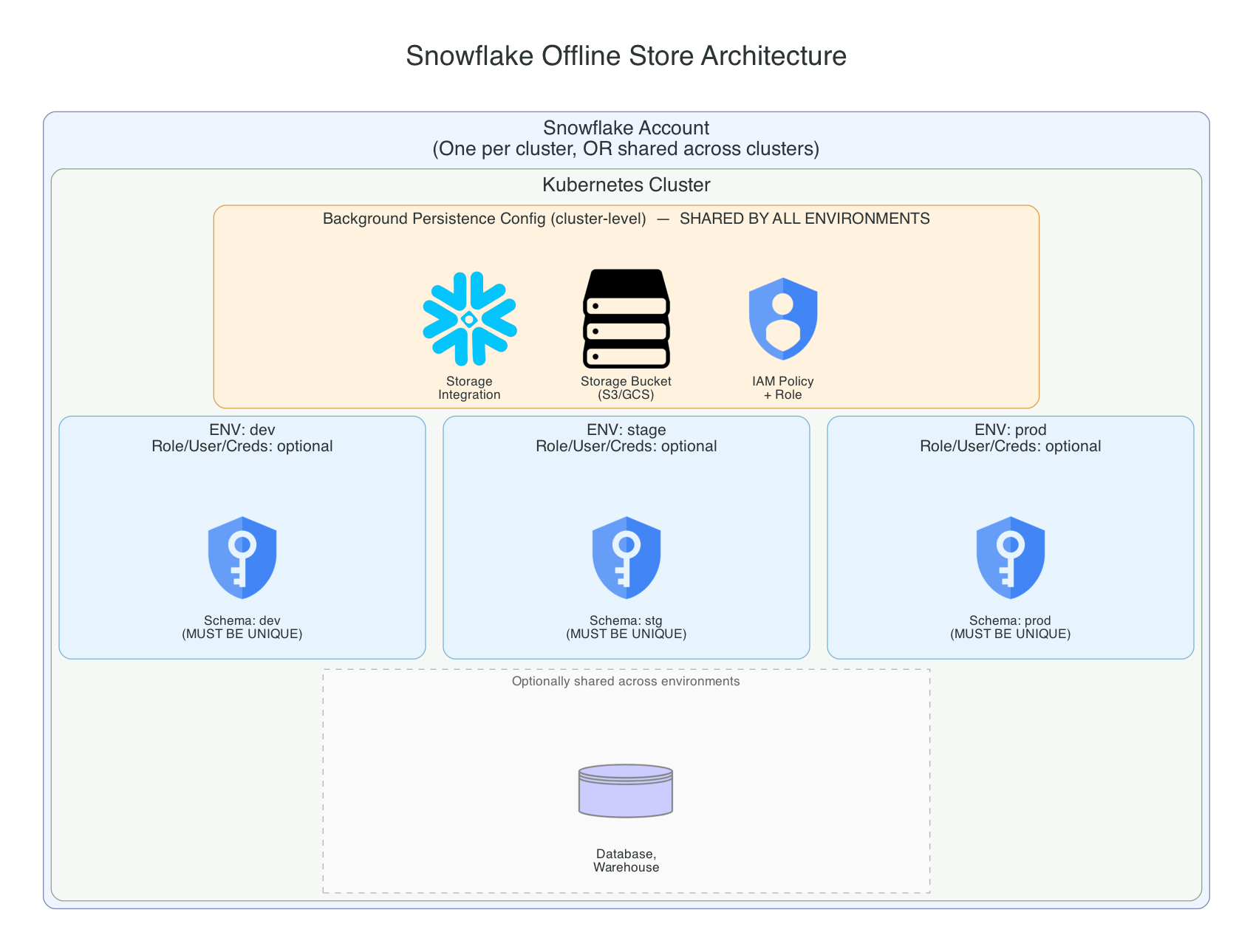
Chalk uses fully-qualified names (FQNs) to route data and ensure isolation between environments without contamination. Each environment can use its own storage integration, or share a single cluster-level integration.
The storage bucket is the one exception to “cluster-level.” Snowflake and its storage bucket are third-party resources that don’t live inside a Chalk cluster at all, so the real sharing boundary is the cloud account backing the bucket (the AWS account or GCP project), not the Chalk cluster. For almost every deployment these line up one-to-one (one cloud account per cluster), which is why thinking of the bucket as “cluster-level” gives the right answer in practice. But if your clusters live in separate cloud accounts (the common case for regionally-separated deployments), each account needs its own bucket. See Multi-Account Deployments below for a worked example.
Time Travel Requirement
Chalk’s wide-table materialization reads every skinny source table at one shared warehouse timestamp using
Snowflake Time Travel. Keep the effective DATA_RETENTION_TIME_IN_DAYS at 1 or greater for the Chalk
offline-store schema and its tables. Snowflake defaults this parameter to one day, and tables inherit it from
their schema, database, or account unless explicitly overridden. An effective value of 0, whether inherited
or set directly on a table, causes wide fills to fail because Snowflake cannot serve the required snapshot.
Snowflake change tracking is not required.
Audit the effective retention of the tables in an offline-store schema with:
SELECT TABLE_NAME, RETENTION_TIME
FROM <database>.INFORMATION_SCHEMA.TABLES
WHERE TABLE_SCHEMA = '<schema>';Component Sharing Rules
Must Be Unique Per Environment
| Component | Notes |
|---|---|
| Schema | Each environment must have its own schema (e.g., OFFLINE_STORE_DEV, OFFLINE_STORE_PROD) |
| Role | Recommended: separate roles for security isolation |
| User | Recommended: separate users with separate credentials |
Must Be Shared (Per Cloud Account)
| Component | Notes |
|---|---|
| Storage Bucket | One per cloud account — AWS account or GCP project (not per cluster, see Multi-Account Deployments) |
Your Choice: Share or Separate
| Component | Shared | Separated | When to Separate |
|---|---|---|---|
| Storage Integration | One per cluster | One per environment | Stricter isolation, or separate cloud credentials/IAM per environment |
| Database | CHALK for all envs | CHALK_DEV, CHALK_PROD | Regulatory requirements, separate billing |
| Warehouse | CHALK_WAREHOUSE for all | CHALK_WH_DEV, CHALK_WH_PROD | Independent scaling, separate cost tracking |
| Snowflake Account | One account for cluster | Separate accounts | Cannot have multiple per cluster |
The IAM policy/role is tied to whichever storage integration it backs — a shared integration uses one IAM role, while per-environment integrations each have their own.
Key Takeaways
- Schema is the critical isolation boundary: each environment must have its own unique schema
- The storage bucket follows the cloud account, not the cluster: one bucket per AWS account or GCP project; clusters sharing a cloud account can share a bucket, but clusters in separate accounts each need their own
- Storage integration is flexible: share one across the cluster, or give each environment its own for stricter isolation
- Database and Warehouse are flexible: share them for simplicity, or separate them for independent scaling/billing
- Chalk handles routing: data is isolated by environment using fully-qualified paths regardless of whether the storage integration is shared
Multi-Account Deployments
Many customers run their US, EU, or other regional deployments as separate clusters in separate cloud accounts, for example one AWS account per region. In that case:
- Each cloud account needs its own storage bucket, storage integration, and IAM role or service-account binding.
- Within one cloud account, every cluster and environment there can still share a single bucket and storage integration, exactly as described above.
- The Snowflake account, database, warehouse, and schema aren’t tied to cloud accounts at all: a single Snowflake account can serve environments across multiple cloud accounts and clusters, as long as each cloud account’s storage integration is configured to read from and write to that Snowflake account.
For example, a customer with a US cluster (two environments) and an EU cluster (one environment), each in its own AWS account, needs two S3 buckets (one per AWS account) but can still use one shared Snowflake account, database, and warehouse across all three environments if they choose to.
Required Snowflake Permissions
Use a dedicated role for Chalk offline-store access. For multi-environment deployments, we recommend a separate role for each offline-store schema. Chalk does not require ownership of the database or schema. The role needs the following minimum privileges on its warehouse and schema:
| Object | Privileges | Why Chalk needs them |
|---|---|---|
| Warehouse | USAGE | Execute offline-store queries and writes |
| Database | USAGE | Access the database containing the offline-store schema |
| Schema | USAGE, CREATE TABLE, CREATE FUNCTION | Access the schema, create feature and temporary work tables, and install the CMIN and CMAX functions used by offline queries |
| Storage integration | USAGE | Load or unload data through an external cloud location when bulk operations are configured |
| Named external stage | USAGE | Access the stage, if the deployment uses a named stage instead of a cloud location directly |
For example, grant the baseline privileges as a Snowflake administrator:
GRANT USAGE ON WAREHOUSE <warehouse> TO ROLE <offline_store_role>;
GRANT USAGE ON DATABASE <database> TO ROLE <offline_store_role>;
GRANT USAGE ON SCHEMA <database>.<schema> TO ROLE <offline_store_role>;
GRANT CREATE TABLE, CREATE FUNCTION ON SCHEMA <database>.<schema> TO ROLE <offline_store_role>;

-- Required when bulk operations use a storage integration.
GRANT USAGE ON INTEGRATION <storage_integration> TO ROLE <offline_store_role>;

-- Required only when the deployment uses a named external stage.
GRANT USAGE ON STAGE <database>.<schema>.<stage> TO ROLE <offline_store_role>;
CREATE FUNCTION is required because Chalk’s offline-store migrations create CMIN and CMAX SQL functions
that implement null-safe timestamp comparisons. Chalk creates tables lazily as features and queries evolve.
The offline-store role automatically owns the tables and functions it creates, which lets Chalk select, insert,
delete, alter, and drop those objects without granting ownership of the database or schema.
Creating a storage integration is an administrative setup operation. The Chalk role needs USAGE on the
configured integration, not the account-level CREATE INTEGRATION privilege. Similarly, grant CREATE STAGE
only if Chalk itself must create a named stage; it is not part of the baseline offline-store permissions.
Dedicated User Account
For a user account created exclusively for Chalk, grant the offline-store role to that user and make it the default role:
GRANT ROLE <offline_store_role> TO USER <chalk_user>;
ALTER USER <chalk_user> SET DEFAULT_ROLE = <offline_store_role>;
Configure the Chalk offline-store connection to use <offline_store_role> explicitly, even when it is the
user’s default role.
Shared User Account
If an existing user account is also used for a Snowflake data source or another workload, do not add offline-store write privileges to its existing role. Grant the isolated offline-store role to the shared user:
GRANT ROLE <offline_store_role> TO USER <shared_user>;Set the offline-store connection’s role field to <offline_store_role>. Other connections using the same user
can continue to select their existing, narrower roles.
Existing Offline Stores
The role that creates a Snowflake table or function owns it. If an existing Chalk offline store was initialized
under another role, granting ALL PRIVILEGES is not sufficient: Snowflake excludes OWNERSHIP from that grant,
and Chalk must be able to alter and drop its objects during schema and feature evolution.
For a schema dedicated entirely to one Chalk environment, a Snowflake administrator can transfer the existing objects to the new offline-store role:
GRANT OWNERSHIP ON ALL TABLES IN SCHEMA <database>.<schema>
  TO ROLE <offline_store_role> COPY CURRENT GRANTS;
GRANT OWNERSHIP ON ALL FUNCTIONS IN SCHEMA <database>.<schema>
  TO ROLE <offline_store_role> COPY CURRENT GRANTS;
Do not run these bulk ownership transfers on a schema containing non-Chalk objects. Transfer only the individual Chalk objects, or provision a dedicated schema instead.
For details about Snowflake privileges and ownership transfers, see Snowflake’s
access control privileges and
GRANT OWNERSHIP documentation.
Multi-Environment Deployment Options
When setting up multiple Chalk environments (e.g., dev, staging, production), you have two approaches:
Option 1: Full Separation (Recommended for Strict Isolation)
Create completely separate resources for each environment:
| Resource | Dev | Stage | Prod |
|---|---|---|---|
| Database | CHALK_DEV | CHALK_STAGE | CHALK_PROD |
| Schema | OFFLINE_STORE | OFFLINE_STORE | OFFLINE_STORE |
| Role | CHALK_ROLE_DEV | CHALK_ROLE_STAGE | CHALK_ROLE_PROD |
| User | CHALK_USER_DEV | CHALK_USER_STAGE | CHALK_USER_PROD |
| Warehouse | CHALK_WH_DEV | CHALK_WH_STAGE | CHALK_WH_PROD |
Benefits:
- Maximum isolation between environments
- Independent resource management and billing
- Easier audit trails
Option 2: Minimal Separation (Simpler Setup)
Share what you can, separate only what you must:
| Resource | Dev | Stage | Prod |
|---|---|---|---|
| Database | CHALK (shared) | CHALK (shared) | CHALK (shared) |
| Schema | OFFLINE_STORE_DEV | OFFLINE_STORE_STAGE | OFFLINE_STORE_PROD |
| Role | CHALK_ROLE_DEV | CHALK_ROLE_STAGE | CHALK_ROLE_PROD |
| User | CHALK_USER_DEV | CHALK_USER_STAGE | CHALK_USER_PROD |
| Warehouse | CHALK_WAREHOUSE (shared) | CHALK_WAREHOUSE (shared) | CHALK_WAREHOUSE (shared) |
The suffixes _DEV, _STAGE, _PROD are examples. Use suffixes that fit your
use case — other common patterns include _UAT, _SANDBOX, _QA, _TEAM1, or environment-specific identifiers.
Benefits:
- Fewer resources to manage
- Simpler credential management
- Lower administrative overhead
Recommendation
Use Option 2 (Minimal Separation) for most deployments. The schema-level isolation provides sufficient separation for feature data, and Chalk’s FQN-based routing ensures data integrity.
Use Option 1 (Full Separation) when:
- Regulatory requirements mandate complete resource isolation
- Different environments need different warehouse sizes or configurations
- You need separate billing or resource quotas per environment
Setup Checklist
Before starting your Snowflake offline store setup, gather the following:
From Your Cloud Environment
- AWS Account ID (where Chalk is deployed) or GCP Project ID
- S3 bucket name or GCS bucket name (typically
chalk-{organization}-data-bucket)
From Snowflake
- Snowflake account name (
SELECT CURRENT_ACCOUNT_NAME();) - Snowflake organization name (
SELECT CURRENT_ORGANIZATION_NAME();) -
DATA_RETENTION_TIME_IN_DAYSof at least1for the offline-store schema and its tables
Permissions Required
- AWS: Permissions to create IAM policies, roles, and update trust relationships
- GCP: Permissions to create IAM custom roles and assign roles to service accounts
- Snowflake administrator: One-time permissions to create the selected database, warehouse, schema, storage integration, role, and user. Do not grant these administrative permissions to the runtime Chalk role.
Cloud-Specific Setup Guides
Choose the guide that matches your cloud provider:
- Snowflake Setup for AWS: S3 storage integration with IAM roles
- Snowflake Setup for GCP: GCS storage integration with service accounts