- Feature Engine
- Materialized Windowed Aggregations
Feature Engine
Materialized Windowed Aggregations
Cache and materialize feature aggregations
Machine learning teams often build and maintain separate pre-aggregation pipelines that relay data as standalone features into a feature store to reduce the latency of computing expensive features.
With Chalk, developers don’t need to spin up separate pipelines to materialize aggregations. This can be done with just a single line of code without compromising on flexibility:
from chalk.features import features, Vector, _
from chalk import DataFrame, Windowed, windowed
from datetime import datetime

@features
class Transaction:
    id: int
    amount: float
    category: int
    user_id: "User.id"
    timestamp: datetime
    embedding: Vector[384]

@features
class User:
    id: int
    transactions: DataFrame[Transaction]
    total_transaction_amount: Windowed[float] = windowed(
        "1d", "7d", "30d",
        materialization={"bucket_duration": "1d"},
        expression=_.transactions[
            _.amount,
            _.timestamp <= _.chalk_now,
            _.timestamp > _.chalk_window
        ].sum(),
    )
    most_active_categories: Windowed[list[int]] = windowed(
        "30d", "60d", "all",
        materialization={"bucket_duration": "1h"},
        # The approximate top 10 categories that the user has
        # spent at in each of the windowed buckets.
        expression=_.transactions[
            _.category,
            _.timestamp <= _.chalk_now,
            _.timestamp > _.chalk_window
        ].approx_top_k(k=10)
    )
    avg_embedding: Windowed[Vector[384]] = windowed(
        "30d", "60d", "all",
        materialization={"bucket_duration": "1h"},
        # Vector mean will be computed as the element-wise
        # mean for each component of the vector
        expression=_.transactions[
            _.embedding,
            _.timestamp <= _.chalk_now,
            _.timestamp > _.chalk_window
        ].mean(),
        default=[0.0] * 384
)Why are materialized aggregations useful?
Windowed features are typically computed using either raw data or pre-aggregated data. Raw data is the ground truth, but aggregating it can be slow if you request long time windows or large volumes of data. Some systems improve performance by serving features from pre-aggregated batch data, mitigating high latency with the trade-off of not having access to the freshest data.
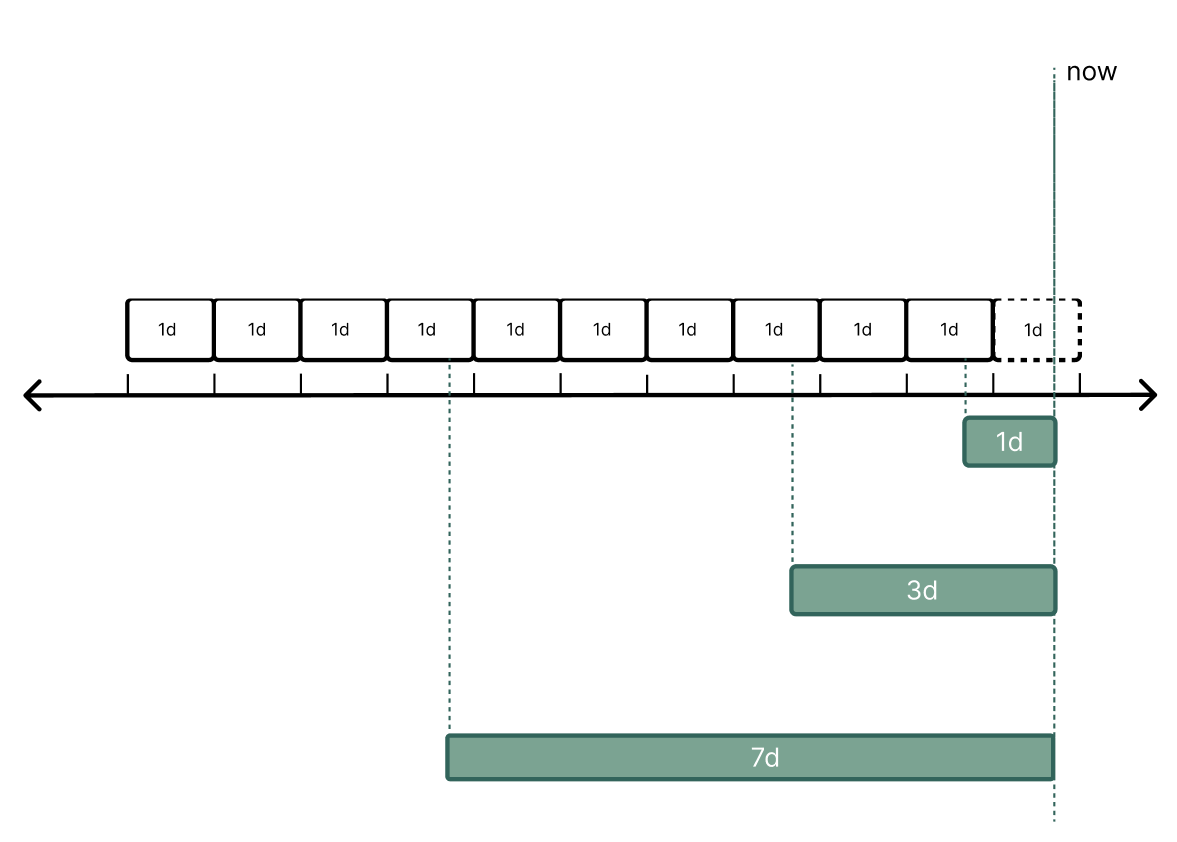
Chalk balances accuracy and performance by combining both approaches. Chalk aggregates historical data into buckets in the online store and continuously updates those buckets as new data arrives. Chalk automatically rolls new data into the appropriate buckets and reconstructs the aggregations. Buckets that become stale i.e. no longer relevant to any of your active time windows, are automatically cleaned up. For each bucket, Chalk stores the minimal required partial aggregate state, and at query time Chalk computes the requested aggregation by merging the partial aggregate states for every bucket that overlaps the requested time window.
Chalk aligns buckets on Unix epoch (ignoring leap seconds) by default. However, if you’d like to customize
the bucket starts, you can use the bucket_start field on the MaterializationWindowConfig in your definition.
When serving windowed queries, Chalk uses all buckets containing any overlap with the requested time window.
What types of aggregations does Chalk support?
Chalk supports a number of aggregations out-of-the-box.
Chalk builtins are very performant as they’re optimized and run natively in C++ and Rust.
Aggregations automatically skip null or None values.
The following table lists the supported aggregation functions:
| Function | Notes |
|---|---|
sum | Support for vector and scalar feature aggregations. |
min | |
max | |
min_by_n | Returns a list of the n values for the minimum by values. |
max_by_n | Returns a list of the n values for the maximum by values. |
set_agg | Returns the deduplicated set of values in the column as a list. Order is not guaranteed. |
mean | Feature type must be Vector, float or float | None. None values are skipped, meaning they are not included in the mean calculation. |
count | |
std | Standard deviation. Requires at least 2 values. |
var | Variance. Same requirements as std. |
stddev_pop | Population standard deviation. Requires at least 1 value. |
var_pop | Population variance. Same requirements as stddev_pop. |
skewness | Skewness of the distribution. Computed using Fisher’s moment coefficient of skewness. Accepts an optional bias keyword argument which defaults to True. Setting True produces the biased (population) coefficient, False produces the bias-corrected (sample) coefficient. Requires at least 3 values and returns null otherwise. |
kurtosis | Kurtosis of the distribution. Computed using Pearson moments. Accepts an optional bias keyword argument which defaults to True, and an optional fisher keyword argument which defaults to True. Setting bias=True gives the biased (population) excess coefficient, and setting bias=False makes the result bias-corrected. Setting fisher=True computes excess kurtosis (normal → 0), and setting fisher=False computes Pearson (normal → 3). Requires at least 4 values and returns null otherwise. |
approx_count_distinct | An approximation of the cardinality of non-null data. Uses Apache DataSketches CPC. |
approx_top_k | An approximation of the most common values in a field. Takes in a required k parameter, such as approx_top_k(k=5) for the five approximately-most common values. Up to k values will be returned, sometimes fewer. The optional counters parameter sets how many distinct values the underlying sketch tracks, which defaults to 2 * k; raising it trades memory for accuracy on high-cardinality data. For a weighted count of the most common values, you can use the parameter by, and set return_total_weight to True or False, which will return the top k values based on the by parameter, optionally with the total weight as well. |
approx_percentile | An approximation of the value a given percentage of your data falls below. Accepts quantile parameter, between 0 and 1, such as approx_percentile(quantile=.5). |
These aggregations can be applied to DataFrame features that represent a has-many join relationship between two feature classes. These joins are defined using a join key, which can either be implicit like below, or explicit through the has-one function.
from chalk.features import features, _
from chalk import DataFrame, Windowed, windowed
from datetime import datetime

@features
class Transaction:
    id: int
    amount: float
    timestamp: datetime
    user_id: "User.id"

@features
class User:
    id: int
    transactions: DataFrame[Transaction]
    total_transaction_amount: Windowed[float] = windowed(
        "1d", "7d", "30d",
        # materialize your features in a single line
        materialization={"bucket_duration": "1d"},
        expression=_.transactions[
            _.amount,
            _.timestamp <= _.chalk_now,
            _.timestamp > _.chalk_window
        ].sum(),
    )
Materialized aggregations can also be applied to DataFrame features that are defined using a composite join key.
from chalk.features import features, has_many, _
from chalk import DataFrame, Windowed, windowed
from datetime import datetime

@features
class Transaction:
    id: int
    bank: str
    user_id: str
    timestamp: datetime
    amount: float

@features
class User:
    id: int
    bank: str
    transactions: DataFrame[Transaction] = has_many(
        lambda: (Transaction.user_id == User.id) & (Transaction.bank == User.bank)
    )
    total_transaction_amount: Windowed[float] = windowed(
        "1d", "7d", "30d",
        # materialize your features in a single line
        materialization={"bucket_duration": "1d"},
        expression=_.transactions[
            _.amount,
            _.timestamp <= _.chalk_now,
            _.timestamp > _.chalk_window
        ].sum(),
    )

    top_5_bank_amounts: Windowed[list[str]] = windowed(
        "7d", "14d",
        materialization={"bucket_duration": "1d"},
        expression=_.transactions[
            _.bank,
            _.timestamp <= _.chalk_now,
            _.timestamp > _.chalk_window
        ].max_by_n(_.amount, 5),
    )

    lowest_5_bank_amounts: Windowed[list[str]] = windowed(
        "7d", "14d",
        materialization={"bucket_duration": "1d"},
        expression=_.transactions[
            _.bank,
            _.timestamp <= _.chalk_now,
            _.timestamp > _.chalk_window
        ].min_by_n(_.amount, 5),
    )

    distinct_banks: Windowed[list[str]] = windowed(
        "7d", "14d",
        materialization={"bucket_duration": "1d"},
        expression=_.transactions[
            _.bank,
            _.timestamp <= _.chalk_now,
            _.timestamp > _.chalk_window
        ].set_agg(),
    )
Approximate Count Distinct
The approx_count_distinct aggregation provides an efficient way to estimate the number of unique values in your data using the
Compressed Probability Counting (CPC) sketch
algorithm.
Why use approximate count distinct?
Computing exact distinct counts for large datasets can be memory-intensive and slow, especially for materialized aggregations where you need to track uniqueness across many time buckets. The CPC sketch algorithm provides:
- Memory efficiency: Uses significantly less memory than storing all unique values
- Mergeable sketches: Partial aggregates from different buckets can be efficiently combined
- High accuracy: Provides estimates with low relative error (typically < 2% for reasonable sketch sizes)
How do I use materialized aggregations with Chalk?
Users can materialize a feature aggregation in Chalk by supplying the materialization
parameter of the windowed function on the feature you want to aggregate.
In the example above, we specify a bucket_duration of "1d".
The materialization parameter takes in a dictionary that adheres to the schema outlined by MaterializationWindowConfig:
bucket_durationDurationThe Duration of each bucket in the window e.g. “1h”
bucket_durationsMapping[Duration, Sequence[Duration] | Duration]A dictionary that specifically maps bucket durations to your window intervals e.g. if you wanted
to use “10m” bucket durations for your
“1d” window interval and
“3d” bucket durations for your
“30d” window interval. We recommend explicitly mapping
bucket durations to each window if your window intervals have a wide discrepancy e.g. ten minute
bucket duration with a one year window interval. Any window intervals not explicitly included in
the “bucket_durations”
dictionary will use your supplied “bucket_duration” by
default.
backfill_scheduleCronTab | NoneThe schedule on which to automatically backfill the aggregation. For example,
”* * * * *”
or “1h”. See CronTab
for more details.
backfill_lookback_durationDuration | NoneA tolerance for late-arriving data in scheduled backfills. Each scheduled backfill run
normally resumes from the previous run’s upper bound; with a lookback duration, the run
starts that much earlier instead, re-aggregating the overlapping span and overwriting the
previously backfilled buckets. Set this to the maximum lateness of events in your data
source, for example “2h”.
continuous_buffer_durationDuration | NoneThe minimum period of time for which to sample data directly via online query, rather than from the backfilled aggregations.
offline_continuous_buffer_durationDuration | NoneThe continuous buffer to use for offline queries, in place of
continuous_buffer_duration. When unset, offline
queries use continuous_buffer_duration. See
A separate buffer for offline queries.
backfill_tagslist[list[str]] | NoneA list of tag sets to use when running scheduled backfills. Each inner list is a set of query
tags passed to the resolver for one scheduled backfill run. For example,
[[], [“source:a”], [“source:b”]]
will create three separate scheduled backfill jobs — one with no tags, one tagged
source:a, and one tagged
source:b. See
Running backfills with tags for more details.
When you query for a specific window_interval, Chalk aggregates over all buckets that intersect with the window interval.
Aggregating through a has-one
Materialized aggregations can also be defined on a feature class that reaches the events through a single has-one hop, not just directly on the class that owns the has-many.
For example, a FraudFeatures class scoped to a user can count that user’s transactions even though the transactions has-many lives on User:
from chalk.features import features, Primary, _
from chalk import DataFrame, Windowed, windowed
from datetime import datetime


@features
class Transaction:
    id: Primary[int]
    user_id: "User.id"
    amount: float
    ts: datetime


@features
class User:
    id: Primary[int]
    transactions: DataFrame[Transaction]


@features
class FraudFeatures:
    id: Primary[int]
    user_id: User.id
    user: User
    # `_.user.<has_many>` walks the has-one prefix, then aggregates the
    # foreign has-many — the materialization itself still lives on the
    # `Transaction` namespace.
    txns_30d: Windowed[int] = windowed(
        "30d",
        materialization=True,
        expression=_.user.transactions.count(),
    )
Only a single has-one is allowed before the has-many. Chains like _.a.b.transactions.count() are rejected at parse time. The has-one’s foreign join key must overlap with the has-many’s local join key on the intermediate class (e.g. FraudFeatures.user_id ==(has-one) User.id ==(has-many) Transaction.user_id).
Bucket Duration
If you want to use one bucket size for all of your window intervals, you can just use the bucket_duration parameter. If your window intervals have a wide discrepancy (say, 1d and 365d), you can use the bucket_durations parameter to explicitly configure creation of differently-sized buckets tailored for each window interval.
For example:
materialization={
    "bucket_duration": "1d",
    "bucket_durations": {
        "1d": ["7d", "30d"],
        "5d": ["60d", "90d", "180d"],
    },
}Storage
Selecting the right bucket duration is a tradeoff between accuracy and storage. Shorter bucket durations will yield more accurate results, but will require more storage.
To optimize for accuracy given a storage constraint, you can compute the approximate storage costs by computing the number of buckets needed for your materialized aggregation, and then computing the storage per bucket.
Buckets of the same size will be reused across all relevant window interval calculations, but each configured bucket duration creates a separate set of buckets.
The storage used per bucket is the sum of the size of the online storage key representation for the primary key, as well as the size of the bucket state.
Size of the bucket state depends on the type of aggregation:
- 9 bytes for simple aggregations such as sum, min, and max,
- 18 bytes for mean,
- ~50-200 bytes for more complex aggregations like approx_count_distinct.
For more details on determining the tradeoff between accuracy and storage space, please reach out to the Chalk team.
Backfilling data and managing aggregation
Chalk provides multiple ways to backfill and update your windowed aggregations.
You can control how your aggregations are backfilled by:
- Supplying a cron expression (CronTab) to the
backfill_schedulekeyword parameter. - Supplying a Duration to
continuous_buffer_duration. - Triggering a backfill job using the Chalk CLI with
chalk aggregate backfill.
Cron Schedule Expression
from chalk.features import features, _
from chalk import DataFrame, Windowed, windowed
from datetime import datetime

@features
class Transaction:
    id: int
    amount: float
    timestamp: datetime
    user_id: "User.id"

@features
class User:
    id: int
    transactions: DataFrame[Transaction]
    total_transaction_amount: Windowed[int] = windowed(
        "10d", "90d",
        materialization={
            "bucket_duration": "1d",
            "backfill_schedule": "0 0 * * *",
            "continuous_buffer_duration": "36h",
        },
        expression=_.transactions[
            _.amount,
            _.timestamp <= _.chalk_now,
            _.timestamp > _.chalk_window
        ].sum(),
    )
In the example above, we supply a cron expression that’s set to run daily at midnight ("0 0 * * *") into the
backfill_schedule parameter of the materialization config.
Now that backfill_schedule has been set, the total_transaction_amount feature will be backfilled every day.
Continuous Buffer
In addition to backfilling your aggregation with the recurring batch job, you can also keep recent windows fresh with live lookups through a continuous buffer duration.
Configure this by supplying a Duration to continuous_buffer_duration, for example "36h".
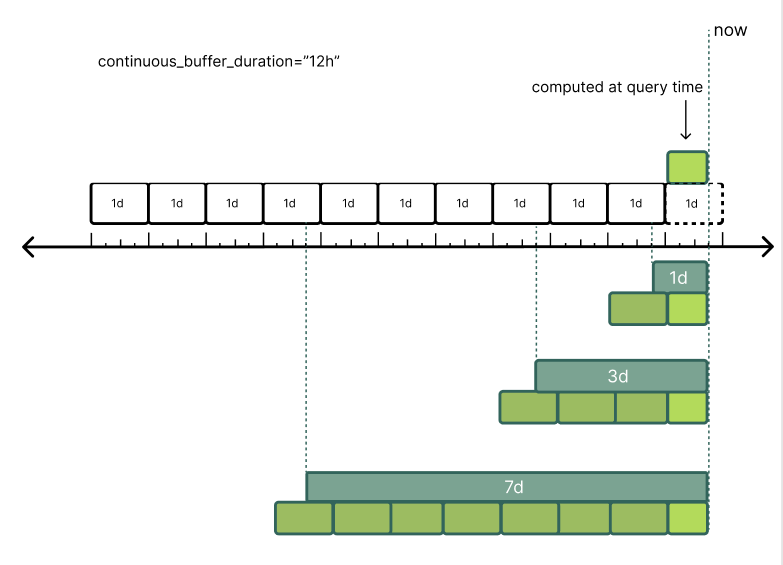
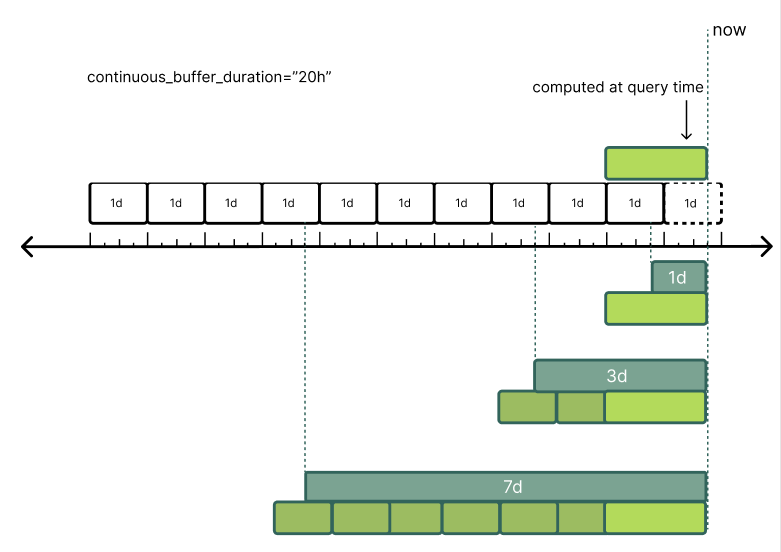
Chalk will compute data within your continuous_buffer_duration directly from your online resolvers.
Note: Chalk includes all the data contained in the bucket partially overlapping with the continuous buffer duration. We suggest shortening the bucket duration, if the time delta between the end of your window interval and the boundary of the last overlapping bucket exceeds the constraints of your use case.
If continuous_buffer_duration is not set, then Chalk will only serve data from the backfilled aggregations.
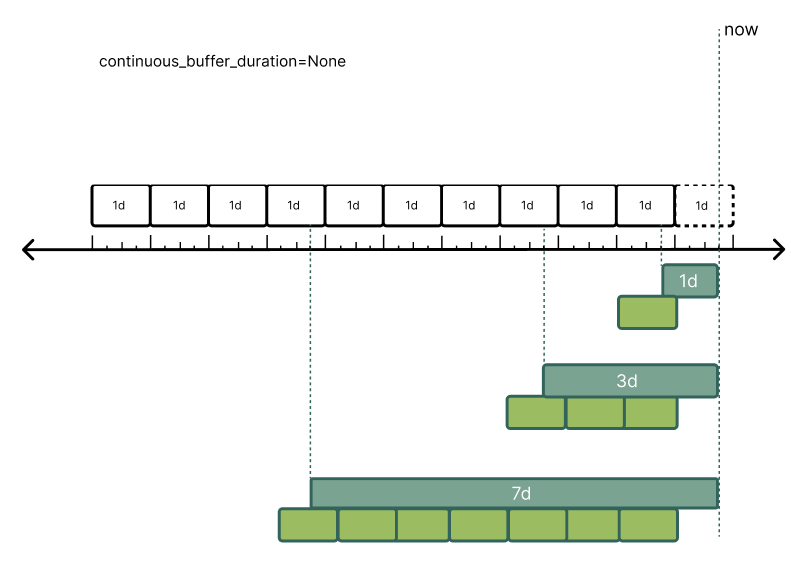
If continuous_buffer_duration is set, and its value is less than the duration between the end of the last bucket
and the current time, Chalk will run online resolvers to compute the data for this time window.
If the continuous_buffer_duration is longer than the duration between the end of the last bucket and the current time,
Chalk will run online resolvers to compute the data from the start of the most recently filled bucket to now.
A separate buffer for offline queries
Offline queries read the same backfilled aggregations, but their trailing edge lags the online
path, so the span that has to be recomputed from raw events is a different one. Supply a
Duration to offline_continuous_buffer_duration to size that span
independently:
@features
class User:
    id: int
    transactions: DataFrame[Transaction]
    total_transaction_amount: Windowed[float] = windowed(
        "1d",
        "7d",
        materialization={
            "bucket_duration": "1h",
            "continuous_buffer_duration": "1h",
            "offline_continuous_buffer_duration": "36h",
        },
        expression=_.transactions[_.amount].sum(),
    )
Offline queries for total_transaction_amount recompute the trailing 36 hours from
transactions; online queries recompute the trailing hour, exactly as they would without this
parameter. Aggregate backfills are unaffected — they write the buckets rather than read them.
Setting offline_continuous_buffer_duration on its own, with no continuous_buffer_duration, is
what makes an aggregation serve online queries purely from the backfilled buckets while offline
queries still keep the recent span fresh.
Triggering a backfill through the Chalk CLI
Use chalk aggregate backfill to trigger a backfill aggregation for a windowed feature.
This command is useful if you change your feature’s time windows or bucket_duration values.
To view existing aggregations, use chalk aggregate list.
To write pre-aggregated tiles to offline storage (S3) instead of the online store, pass --store-offline.
This is required before you can read tiles in offline queries using use_tile_store.
--store-offline requires both --lower-bound and --upper-bound as ISO 8601 instant strings.
chalk aggregate backfill \
  --feature user.total_transaction_amount \
  --store-offline \
  --lower-bound 2025-01-01T00:00:00Z \
  --upper-bound 2026-04-14T00:00:00Z
Series Namespace Group Agg Bucket Retention Aggregation Dependent Features
────────────────────────────────────────────────────────────────────────────────────────────────────────────────────────────────────
1 transaction user_id merchant_id amount 1d 30d sum user.txn_sum_by_merchant merchant.txn_sum_by_user
1 transaction user_id merchant_id amount 1d 30d count user.txn_count_by_merchant
2 transaction user_id amount 1d 30d sum user.txn_sum
The series column shows the unique ID of the timeseries data underlying our aggregation system.
Each unique combination of the Namespace,
Group (see group_by_windowed), and Agg (the aggregated feature) columns represents a separate timeseries.
When possible, Chalk will use the same timeseries data to serve multiple features.
Other useful information here is the Bucket column, which shows the current bucket size.
The Retention column shows the maximum time window of any feature that depends on the given timeseries.
The Dependent Features column lists the features that are served by the given timeseries.
Running backfills with tags
You can use backfill_tags to run multiple scheduled backfills for the same feature with different resolver tags.
This is useful when you have multiple resolvers from different sources that get data for different primary keys
and want each tagged resolver to independently populate buckets.
from chalk.features import features, _
from chalk import DataFrame, Windowed, windowed
from chalk.streams import MaterializationWindowConfig
from datetime import datetime

@features
class Transaction:
    id: int
    amount: float
    timestamp: datetime
    user_id: "User.id"

@features
class User:
    id: int
    transactions: DataFrame[Transaction]
    total_transaction_amount: Windowed[int] = windowed(
        "10d", "90d",
        materialization=MaterializationWindowConfig(
            bucket_duration="1d",
            backfill_schedule="0 0 * * *",
            backfill_tags=[[], ["source:a"], ["source:b"]],
        ),
        expression=_.transactions[
            _.amount,
            _.timestamp <= _.chalk_now,
            _.timestamp > _.chalk_window
        ].sum(),
    )
In this example, Chalk will create three separate scheduled backfill jobs — one with no tags, one with source:a,
and one with source:b. Each run passes its tag set to the resolver as query tags, allowing you to select
different resolvers per run. Resolver tags on their own do not change which backfill or query runs; you still need
to pass the matching tags when you trigger a query or backfill manually. See Query Basics,
the Chalk Python SDK query reference, and chalk aggregate backfill.
If multiple backfills resolve data for overlapping primary keys and time buckets, later writes will overwrite earlier ones. Disjoint set of primary keys are expected, if your resolvers may return data for the same primary key under different tags the results are not additive.
Materialized aggregations with streaming data
For information on updating materialized aggregations with streaming data, see the example in the streaming documentation here. To evolve materialized aggregations across versions using versioned features, see Versioned Windowed Aggregations.
Updating aggregations via upload_features
You can upload child records into materialized aggregations directly from an external pipeline using
ChalkGRPCClient.upload_features with update_mataggs=True. Chalk recomputes the affected materialized aggregation
buckets from the uploaded records rather than storing raw feature values.
The uploaded records must include a FeatureTime column so Chalk can determine which time buckets to update.
from datetime import datetime, timezone
import pyarrow as pa
from chalk.client.client_grpc import ChalkGRPCClient
from chalk import DataFrame, FeatureTime, Primary, windowed
from chalk.features import _, features

@features
class Transaction:
    id: Primary[int]
    user_id: "User.id"
    amount: float
    ts: FeatureTime

@features
class User:
    id: Primary[int]
    transactions: DataFrame[Transaction]
    total_spend: "Windowed[float]" = windowed(
        "7d", "30d",
        materialization={"bucket_duration": "1d"},
        expression=_.transactions[_.amount].sum(),
    )

client = ChalkGRPCClient()

now = datetime.now(timezone.utc)
batch = pa.RecordBatch.from_pydict({
    "transaction.id": [101, 102, 103],
    "transaction.user_id": [42, 42, 42],
    "transaction.amount": [10.0, 25.0, 5.0],
    "transaction.ts": [now, now, now],
})

response = client.upload_features(inputs=batch, update_mataggs=True)
After this call, User.total_spend["7d"] and User.total_spend["30d"] will reflect the newly uploaded
transactions for user 42.
Caveats:
update_mataggsis only available onChalkGRPCClient.upload_features. The HTTP-basedChalkClient.upload_featuresandChalkClient.multi_upload_featuresdo not support this option.- The
FeatureTimecolumn is required. Uploads without it cannot be routed to the correct aggregation buckets and will not update aggregations correctly. - For high-volume ingestion of raw child records into aggregations, consider
ChalkGRPCClient.upload_features_bulk, a dedicated endpoint optimized specifically for this pattern.
See Uploading Features for full API reference and additional upload options.
Materialization with Offline Queries
By default, offline queries that request materialized windowed aggregations run resolvers (preferring offline resolvers over online resolvers) to recompute the aggregation expression from raw events. Two planner options let you improve accuracy and performance:
align_offline_chalk_window_with_materialization— rounds each input time’s lower bound down to the nearest bucket boundary, perfectly simulating the rounding behavior of the online store.use_materialized_offline_query— computes each row’s value by merging buckets instead of aggregating the raw events inside the exact window. For each input time, Chalk shifts each bound of the window by its offset and aligns both bounds down to the bucket grid. It then merges the buckets from the one that contains the lower bound up to, but not including, the one that contains the upper bound. For a worked example, see Training Sets with Materialized Aggregations.
Offline Store Tiling
When tiles have been backfilled to offline storage with --store-offline (see Triggering a backfill through the Chalk CLI), you can instruct the planner to read directly from those pre-aggregated S3 tiles by also setting use_tile_store: True:
from chalk.client import ChalkClient, ResourceRequests
from datetime import datetime

client = ChalkClient()

result = client.offline_query(
    input={
        "user.id": [1, 2, 3]
    },
    output=["user.total_transaction_amount"],
    run_asynchronously=True,
    recompute_features=True,
    planner_options={"use_tile_store": True, "use_materialized_offline_query": True},
    input_times=[datetime(2026, 4, 14, 0, 0)],
    resources=ResourceRequests(cpu=4, memory="16Gi"),
)
This reads from pre-aggregated data in cloud storage, instead of recomputing aggregates from raw events, which can be dramatically faster for large historical aggregations. See Training Sets with Materialized Aggregations for a detailed discussion of trade-offs and use cases.
Tiles must have been backfilled to cover the requested input_times before using
use_tile_store. If tiles are missing for part of the range, the offline query will
error.
Scheduled Aggregate Backfills
To keep offline tiles fresh on a recurring basis (for example, computing a new tile every day), use
ScheduledAggregateBackfill. This is the recommended approach for automating offline tile backfills, as
the backfill_schedule field on MaterializationWindowConfig targets the online store only.
from chalk import ScheduledAggregateBackfill, AggregateBackfillTarget
from datetime import datetime

ScheduledAggregateBackfill(
    name="daily_total_transaction_amount_offline_backfill",
    features=["user.total_transaction_amount"],
    schedule="0 1 * * *",  # daily at 1 AM UTC
    target=AggregateBackfillTarget.OFFLINE,
    lower_bound=datetime(2025, 1, 1),
)
Use targets= when the same scheduled backfill should materialize both storage targets from the
same run:
from chalk import ScheduledAggregateBackfill, AggregateBackfillTarget
from datetime import datetime

ScheduledAggregateBackfill(
    name="daily_total_transaction_amount_backfill",
    features=["user.total_transaction_amount"],
    schedule="0 1 * * *",  # daily at 1 AM UTC
    targets=[
        AggregateBackfillTarget.ONLINE,
        AggregateBackfillTarget.OFFLINE,
    ],
    lower_bound=datetime(2025, 1, 1),
)namestrA unique identifier for this backfill schedule. Names must be unique across all
ScheduledAggregateBackfill instances in your project.
featuresCollection[FeatureReference]The features to backfill. At least one feature is required.
scheduleCronTab | DurationtargetAggregateBackfillTargetA single storage target to materialize. Use AggregateBackfillTarget.OFFLINE to
write pre-aggregated tiles to offline storage, or AggregateBackfillTarget.ONLINE
to write aggregate state to the online store. Provide exactly one of target or
targets.
targetsCollection[AggregateBackfillTarget]One or more storage targets to materialize from the scheduled run. Provide exactly one of target or
targets.
lower_bounddatetime | NoneOptional lower bound on the time range to backfill. Converted to UTC automatically.
upper_bounddatetime | NoneOptional upper bound on the time range to backfill. Converted to UTC automatically.
query_tagsCollection[str] | NoneQuery tags to pass to resolvers during the backfill run.
resource_groupstr | NoneThe resource group to run the backfill against.
ScheduledAggregateBackfill with AggregateBackfillTarget.OFFLINE is
critical for operationalizing offline tiling — it ensures a fresh tile is computed each day so
that training set queries can always read from pre-aggregated data without rescanning raw events.